Ever wonder what this is?
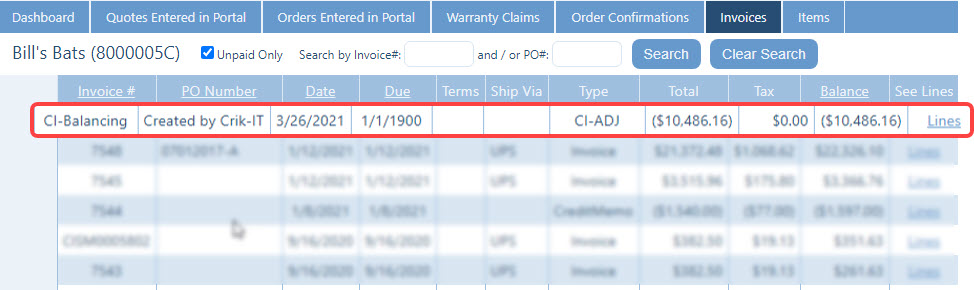
Well, this is automatically created by the portal when the customer's overall balance sent to the portal from the vendor's accounting system does not equal the sum total of open transactions sent to the portal from the vendor's accounting system... like this:
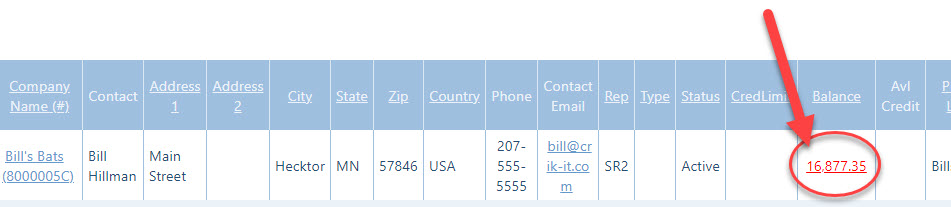
Here's the customer's balance that was sent to the portal:
And... here are the open transactions that were sent to the portal:
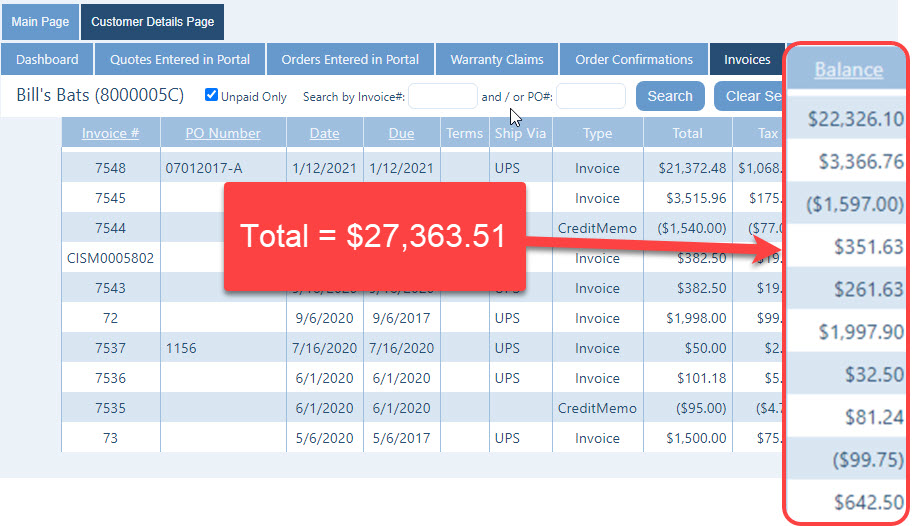
Because the customer balance of $16,877.35 does not equal the total of all open transactions ($27,363.51)... and because accountants just hate it when things don't reconcile... the portal creates the CI-BALANCING transaction. In the example above, the CI-BALANCING transaction was created for -$10,486.16, which is the difference between the customer balance and the open transactions in the portal.
The next question is: Well, why is there a difference at all? This can occur in a number of different situations, such as...
- The portal carries only 1, 2, or 3 years of history, depending on the way the vendor has configured their portal. If there are open transactions that are outside the history shown in the portal, that could cause a difference.
- The vendor's accounting system may have an error in the customer balance.
- There may be an unapplied payment, prepayment, or other adjustment in the vendor's accounting system that is not transferred to the portal.
- The invoice detail that shows in Crik-IT might have gotten out of sync with the invoice data in vendor's accounting system.
- For Crik-IT administrators using QuickBooks: if the invoice detail in Crik-IT does not match the invoice detail in QuickBooks, you should do a full data sync of your invoice data. You do this from the Tools tab, Crik-IT / QuickBooks Config Menu, Sync Your Data, Let Me Choose What To Sync, Sync Invoice Data.